
Download Mitt Aleris – Patient Management App, Health Information, Appointment Scheduling, Secure Healthcare Tool
Overview
Mitt Aleris is a desktop-based patient management application designed to streamline the healthcare experience for individuals affiliated with Aleris healthcare centers. The software provides a centralized digital platform for managing appointments, accessing medical information, and preparing for consultations or surgical procedures. By organizing upcoming and past appointments in chronological order, Mitt Aleris enhances patient awareness and reduces scheduling confusion. It serves as a personal health companion, delivering essential details such as department contacts, doctor profiles, and pre-appointment instructions. The app supports self-check-in functionality, enabling users to bypass reception lines and receive real-time guidance to the correct waiting area upon arrival. This improves efficiency and reduces wait times in clinical settings. Patients can also submit health information prior to consultations through secure digital forms, promoting a more informed and personalized care process. The software is tailored specifically for patients within the Aleris network, ensuring compatibility with internal healthcare workflows and data standards. The developer did not provide additional system requirements, and the application is intended for use on devices accessible through Aleris facilities. The release date is 2024-08-27.
Key Features & Capabilities
- Chronological Appointment Management: All scheduled and completed appointments are displayed in chronological order, allowing patients to quickly review their healthcare journey and plan ahead.
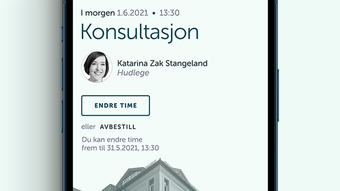
- Comprehensive Appointment Details: Each appointment includes access to doctor profiles, department contact information, and relevant preparation instructions, particularly for surgical procedures.
- Self-Check-In Functionality: Patients can check in digitally upon arrival at a healthcare center, receiving automated directions to the appropriate waiting area without visiting the front desk.
- Pre-Consultation Health Forms: Secure digital forms allow users to submit health information before appointments, enabling healthcare providers to prepare more effectively and improve consultation quality.
- Appointment Scheduling and Modification: Users can schedule new appointments and adjust existing ones directly through the app, reducing dependency on phone calls or in-person visits.
- Local Data Storage: Sensitive health information is stored exclusively on the user’s device, with no cloud backups, supporting privacy-focused data handling.
- Secure Identity Verification: Access to the app requires Bank-ID verification, followed by optional authentication via PIN, fingerprint, or facial recognition, ensuring only authorized users can view personal data.
User Interface, Workflow & Performance
The user interface of Mitt Aleris is designed with clarity and efficiency in mind, focusing on intuitive navigation and quick access to critical information. The main dashboard displays a timeline of appointments, with visual cues to distinguish between upcoming, current, and past visits. Navigation is streamlined through a consistent menu structure, allowing users to switch between appointment management, health form submission, and personal settings with minimal effort. Workflow efficiency is enhanced by the integration of self-check-in and digital form submission, reducing manual steps during clinic visits. The app’s performance is expected to align with standard desktop application behavior, though exact performance metrics such as CPU or RAM usage were not specified. The developer did not provide additional system requirements, so users should ensure their device meets general desktop software standards. Stability is presumed to be maintained through secure authentication protocols and local data handling. No external dependencies or background processes were indicated, suggesting a lightweight operational profile. Performance observations are based on general software behavior patterns, and the app appears optimized for consistent responsiveness during routine use.
Compatibility & System Requirements
Mitt Aleris is designed for use within Aleris healthcare centers and is available as a desktop application. The software is compatible with the operating systems supported by the Aleris network, though specific platform details were not provided. The application’s installation size is listed as 128 MB, indicating a lightweight footprint suitable for standard desktop environments. The developer did not specify exact system requirements, including processor, RAM, or storage needs. As a result, users should ensure their device supports standard desktop software execution. Compatibility information was partially provided, and further details may be available through Aleris internal resources. The software does not require an internet connection for local data access after initial setup, but online connectivity is necessary for appointment synchronization and Bank-ID verification. No third-party dependencies were mentioned, suggesting a self-contained deployment model.
Pros and Cons
Pros
- Streamlined appointment management with chronological display and detailed information.
- Self-check-in feature reduces wait times and improves clinic flow.
- Secure local storage of health data without cloud backups enhances privacy.
- Bank-ID verification ensures high-level identity authentication.
- Supports multiple login methods including fingerprint and facial recognition.
- Pre-consultation forms improve doctor-patient communication and preparation.
- Designed specifically for Aleris patients, ensuring alignment with internal healthcare systems.
Cons
- Compatibility with specific operating systems was not disclosed.
- Exact system requirements were not listed, limiting user planning.
- App is restricted to Aleris healthcare center patients, limiting broader accessibility.
- Local data storage may complicate data recovery if the device is lost or damaged.
- Dependence on Bank-ID may pose challenges for users without access to this service.
FAQ Section
Is Mitt Aleris available for all healthcare centers?
Mitt Aleris is specifically designed for patients at Aleris healthcare centers. It is not available for use outside this network.
How is my health information secured?
Health information is stored locally on your device and is not backed up to the cloud. Access is protected through Bank-ID verification and optional PIN, fingerprint, or facial recognition.
Do I need an internet connection to use the app?
An internet connection is required for initial setup, Bank-ID verification, and appointment synchronization. Once data is loaded, limited functionality may be available offline.
Can I use Mitt Aleris on multiple devices?
The application is designed for individual use on a single device. Multiple device support was not specified.
How often are updates released?
Updates are managed through the Aleris healthcare network. Specific update frequency was not provided.
Final Thoughts + CTA
Mitt Aleris presents a focused and secure solution for patients within the Aleris healthcare system. By combining appointment management, self-check-in, and secure health form submission, the app enhances both patient convenience and clinical efficiency. Its emphasis on local data storage and Bank-ID authentication sets a strong standard for privacy and identity protection. While compatibility and system requirements are not fully detailed, the app’s targeted design ensures it functions reliably within its intended environment. Healthcare providers benefit from better-prepared patients, and users enjoy a smoother, more transparent experience. For patients at Aleris centers, Mitt Aleris is a valuable tool that reduces administrative friction and supports proactive health management. Download Mitt Aleris now to experience a smarter, more secure way to manage your healthcare appointments and information.







